How to Find Guest Posting Clients Using Google Advanced Search?

Introduction
I will explain how you can find potential clients for your guest posting service using Google Advanced Search. This method allows you to search for websites related to a specific product or service and target clients from a particular country. By selecting the right keyword, domain, language, and region, you can find relevant client websites and contact them directly for your guest posting service.
Practical Method: Step-by-Step
- First, open the Google main page.
- At the bottom-right corner, you will see the Settings option, as shown in my picture.
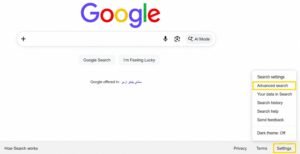
- Click on Settings and then click on the Advanced Search button.
- A new page will open, as shown in the picture I have added.
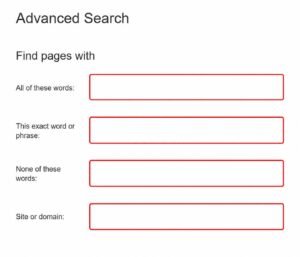
- Now, search for a keyword related to a product or service, such as T-shirt Printing.
- After this, if you want clients from a specific country, enter that country’s domain URL sign in the Domain and Site fields, as I have used .uk.
- At the end, select the Language. Since I have used .uk, I will select English.
- You can select the Language and Region accordijng to the country from which you want to find clients.
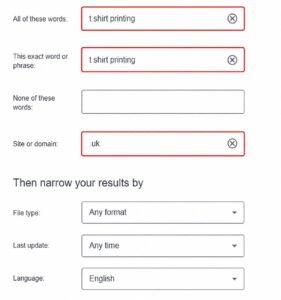
- Now, click on Advanced Search.
- A new tab will show client websites from the country you selected in your search.
- Open these websites one by one and go to the Contact Us page to get the email address. Then, send them your Guest Posting service draft.
Questions & Answers
Q1: What is Google Advanced Search used for?
Google Advanced Search can be used to find relevant client websites by using specific keywords, domains, languages, and regions.
Q2: Can I find clients from a specific country?
Yes, you can select the relevant country domain, language, and region to find clients from a specific country.
Q3: What should I do after finding a client website?
Open the website, go to the Contact Us page, get the email address, and send your Guest Posting service draft.