Guest Posting Client Hunting: Free A to Z Course
Quick Answer
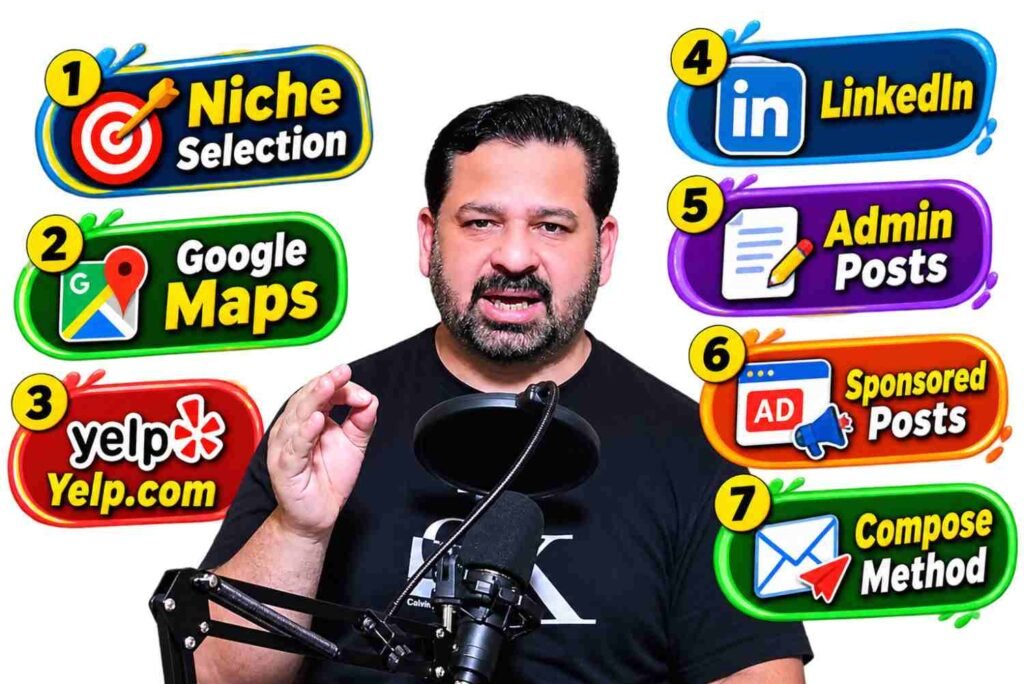
Guest posting client hunting means finding businesses that need backlinks and sending them a personalised offer for guest posts on relevant websites. You can do it completely free: pick one profitable niche, find businesses through Google Maps, Yelp, LinkedIn, recent admin posts and Google sponsored ads, research each lead, and send a short, personal email. By collecting about 20 leads from each of 4 to 5 methods, you can build a list of 80 to 100 potential clients every day.
Key Points at a Glance
- Cost: 100% free. No paid tools or paid course required.
- Course length: 7 short video lessons, from niche selection to email writing.
- Lead-finding methods: Google Maps, Yelp, LinkedIn, Recent Admin Posts and Sponsored Ads.
- Daily target: about 20 leads per method, or 80 to 100 leads per day.
- The full system: Niche Selection → Client Hunting → Client Research → Email Compose → Client Outreach.
- Golden rule: one personalised email beats 100 copy-paste messages.
Today you will learn a complete free method for guest posting client hunting from A to Z. First you will choose the right niche, then you will learn five practical ways to find clients, how to research them, and finally how to write a professional email that gets replies. Watch every video carefully and practise each method as you go.
What Is Guest Posting Client Hunting?
Guest posting is when a business pays to publish an article on another website, usually with a link back to its own site. Those links can help with brand visibility, referral traffic and SEO. Client hunting is the process of finding businesses that want these guest posts and convincing them to buy from you instead of someone else.
A few simple terms you will hear in this course:
- Lead: a business that might need your service but has not replied yet.
- Prospect list: your spreadsheet of leads with their website, email and notes.
- Outreach: contacting leads by email or message.
- Compose: the email you write to a lead, including the subject line and body.
- Decision-maker: the person who can approve a purchase, such as the owner, marketing manager or SEO lead.
Why Is This Guest Posting Client Hunting Course Free?
Many freelancers in Pakistan and around the world pay for courses that teach the same basic methods. This course is free because every method uses free platforms you already have access to: Google, Google Maps, Yelp and LinkedIn. You only need a laptop or phone, an internet connection, a Gmail account and a free Google Sheet to save your leads.
Lesson 1: How Do You Select the Right Niche for Guest Posting Clients?
Successful client hunting starts with the right niche. If you target random businesses, your emails will sound generic and your reply rate will be low. When you focus on one niche, you understand its problems, speak its language and can recommend relevant websites.
A good guest posting niche usually has:
- Businesses with real marketing budgets (for example law firms, dental clinics, home services, SaaS, real estate, travel and health).
- Strong online competition, so SEO actually matters to them.
- Plenty of related blogs where you can offer guest posts.
Tip: start with one niche for at least 30 days before switching. Consistency makes your emails and portfolio stronger.
Lesson 2: How Do You Find Guest Posting Clients on Google Maps?
Google Maps lists millions of local businesses, each with a website, phone number and reviews. It is one of the fastest free ways to build a lead list.
- Search “niche + city“, such as “dentist in Dallas” or “roofing company in Chicago”.
- Open each listing and visit its website.
- Look for signs the business needs SEO help: an outdated website, very few reviews, or no blog.
- Copy the business name, website and contact details into your sheet.
Target: 20 qualified leads in about 45 to 60 minutes.
Lesson 3: How Do You Find Clients on Yelp.com?
Yelp is a popular business directory and review site, especially in the USA. It is ideal for finding service businesses that depend on online visibility.
- Choose your niche category and a city on Yelp.
- Open each business page and find the link to its website.
- Check whether the site ranks for its main service in Google.
- Add good leads to your sheet with a short note, such as “no blog” or “weak rankings”.
Tip: businesses with many reviews but a weak website often already have customers and money, but are missing out on Google traffic.
Lesson 4: How Do You Find Guest Posting Clients on LinkedIn?
LinkedIn helps you reach the real decision-makers instead of a general inbox.
- Search job titles such as “SEO Manager”, “Marketing Director”, “Founder” or “Head of Growth”.
- Filter by industry and country to match your niche.
- Visit their company website and note their content and link gaps.
- Connect with a short, friendly note. Don’t pitch in the first message.
Tip: people who post about growth, marketing or hiring SEO staff are usually the warmest leads.
Lesson 5: What Is the Recent Admin Post Method?
This method finds businesses that are active right now. When a company has recently published blog posts written by “admin”, it usually means it is creating content but may not have an SEO or outreach team.
- Use Google searches that show blogs in your niche with recent “admin” posts.
- Check the post dates. Focus on sites that published in the last 30 to 60 days.
- Note what they write about and how you could help them get more visibility.
Why it works: active businesses are already investing time in content, so they are far more open to a link building offer.
Lesson 6: How Do You Find Clients Through Sponsored Posts and Google Ads?
If a business is paying for Google Ads, it already has a marketing budget. That makes it one of the best types of lead.
- Search your niche keywords in Google and look for results labelled “Sponsored”.
- Note the advertiser’s website.
- Check whether the same business also ranks organically. If not, it relies on paid traffic.
- In your email, explain how guest posts can support long-term organic traffic alongside its ads.
Lesson 7: How Do You Write the Perfect Email to a Guest Posting Client?
Finding clients is only half the job. Your email decides whether they reply. A strong compose has five parts:
- Subject line (4 to 7 words): personal and specific, such as “Quick idea for [Company] rankings”.
- Personal opening: mention something real from their website or LinkedIn.
- One clear problem: for example, “Your competitor ranks above you for [keyword].”
- Your offer: a short line on your guest posting service and 2 or 3 relevant sites.
- Simple call to action: a question, such as “Would you like me to send a few site options?”
Keep it under 120 words. Short, personal emails get far more replies than long sales pitches.
How Do You Stay Compliant When Sending Cold Emails?
If you email clients in the USA, follow the basic rules in the FTC’s CAN-SPAM compliance guide:
- Use honest subject lines and your real name and email.
- Include your business address or contact details.
- Give people a simple way to opt out, and stop emailing them if they ask.
Also be transparent with clients about how paid links work. Google’s official guidance on link spam says links from sponsored and guest posts should be qualified, for example with rel="sponsored". Offering quality, relevant sites and honest advice builds long-term clients.
How Many Guest Posting Clients Can You Find Every Day?
Here is a realistic daily plan if you work about 4 to 5 hours:
| Method | Daily Leads | Time |
|---|---|---|
| Google Maps | 20 | 45–60 min |
| Yelp | 20 | 45–60 min |
| 20 | 45–60 min | |
| Recent Admin Posts | 20 | 30–45 min |
| Sponsored Ads | 20 | 30–45 min |
| Total | 80–100 | 4–5 hours |
Even if only 2% to 5% of leads reply, 100 leads a day can turn into 2 to 5 real conversations every day, and some of those become repeat clients.
Why Is Client Research So Important?
Collecting leads is not enough. Before you send any email, spend 2 to 3 minutes on each lead:
- Check its website, services and blog.
- Find the right person to contact.
- Note one specific detail to mention in your email.
This small step is the difference between an email that gets deleted and one that gets a reply. You can plan how many links each client needs with our free Backlink Planner Tool.
What Is the Daily Client Hunting Challenge?
Don’t just watch the videos. Practise them. For the next 30 days:
- Collect 20 leads from each method you have learned.
- Research and personalise every email.
- Send your emails and follow up once after 3 to 5 days.
- Track replies in your sheet so you know which method works best for your niche.
When a client says yes, you’ll need ready packages to offer. See how we structure ours on our link building services page.
What Should You Do Next? (Action Steps)
- Watch Lesson 1 and choose one niche today.
- Create a free Google Sheet with columns for name, website, email, method and notes.
- Collect 20 leads from Google Maps (Lesson 2).
- Add 20 leads each from Yelp, LinkedIn, Recent Admin Posts and Sponsored Ads (Lessons 3 to 6).
- Spend 2 to 3 minutes researching each lead.
- Write a personalised email under 120 words using Lesson 7.
- Send your emails and follow up once after 3 to 5 days.
- Repeat daily for 30 days and track your replies.
The complete system: Niche Selection → Client Hunting → Client Research → Email Compose → Client Outreach. That is the full A to Z guest posting client hunting system, in one free course.
Frequently Asked Questions
Is this guest posting client hunting course really free?
Yes. All 7 lessons are free, and every method uses free platforms such as Google Maps, Yelp and LinkedIn.
How many clients can I find in one day?
By collecting about 20 leads from each of 4 to 5 methods, you can build a list of 80 to 100 potential clients per day.
Which method is best for beginners?
Google Maps is the easiest place to start because every listing shows a website and contact details.
How long does it take to get the first client?
It depends on your niche and email quality, but many beginners land their first order within 2 to 4 weeks of consistent daily outreach.
Do I need paid tools for client hunting?
No. A Gmail account, a free Google Sheet and the free methods in this course are enough to get started.

Muhammad Amjad Butt
SEO Trainer, CEO & Founder of PB Outreach
Muhammad Amjad Butt is an SEO specialist with 21+ years of experience, the CEO and founder of PB Outreach, and the trainer behind Pak SEO Training. He has trained 500+ students and completed 1,000+ guest posting projects for clients.
📚 Related Posts
How to Find Guest Post Buyers Using Google Ads Transparency
Find guest post buyers free with Google Ads Transparency Center. Search a niche, switch to the US region, read ad signals and…

6 Cold Email Mistakes That Lose Link Building Clients
Sending site lists, long emails and unread ChatGPT pitches kills replies. Learn 6 cold email mistakes that lose clients, with examples and…
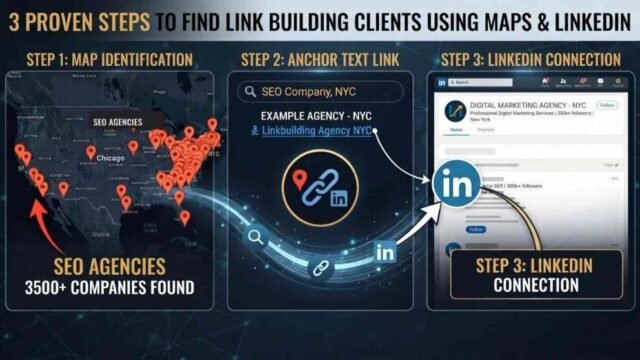
How to Find Link Building Clients in the US (3 Methods)
Learn how to find link building clients in the USA using anchor text from paid guest posts, with Google, Google Maps and…