How to Find Profitable Guest Posting Clients Using Trustpilot?


Introduction
In today’s article, I will tell you about a platform from which we can find many profitable clients for guest posting. The name of this platform is Trustpilot.
Practical Steps
- Open Google
First, open Google and search for Trustpilot. - Open the Trustpilot Website
In the search results, open the first website, Trustpilot.com. The Trustpilot homepage will open.
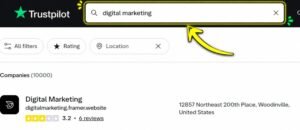
- Search Your Niche
On Trustpilot, you can search for any niche you want. For example, I searched for Digital Marketing. - Open the Companies
After searching, different companies will appear. Open these companies one by one. - Click on the Visit Website Option
After opening a company profile, you will see the Visit Website option, as I have mentioned in the picture.

- Open the Client’s Website
Click on Visit Website to go to the client’s original website. - Get the Email from Contact Us
Go to the client’s website, open the Contact Us page, and get the client’s email address. - Send Your Guest Posting Draft
After getting the email, send your guest posting draft to the client. - Choose Relevant Websites
The most important thing is that the websites included in your draft should be related to the same niche as the client you searched for on Trustpilot. - Increase Your Chances of Getting a Response
When the client’s niche and the websites you offer are relevant, there are better chances of getting a response from the client.
Questions & Answers
Q1: Which platform can we use to find profitable guest posting clients?
Answer: We can use Trustpilot to find profitable guest posting clients.
Q2: How can we find the client’s email address?
Answer: Open the client’s website through the Visit Website option and then go to the Contact Us page to find the email address.
Q3: What type of websites should we include in the guest posting draft?
Answer: We should include websites related to the same niche as the client.