Answer:-
The GSC Impression-to-Click Trap occurs when Google displays your web pages thousands of times in search results, but users rarely click through, signaling a critical gap between what searchers expect and what your content delivers.
Thank you for reading this post, don't forget to subscribe!Key Points
-
The High Impression / Low CTR Trap: Spotting pages where Google gives you high visibility in SERPs, but clicks remain stagnant (under 1% to 2%).
-
Search Intent Mismatch: The core reason users ignore your link is that your content format or angle does not match what they are actively looking for.
-
SERP Reverse-Engineering: Analyzing top-ranking competitors to discover whether users want lists, guides, or transactional product pages.
-
Semantic Content Alignment: Integrating missing sub-queries, LSI terms, and direct answers extracted straight from Google Search Console (GSC).
-
AI & LLM Advantage: Optimizing your content structure not only satisfies traditional search crawlers but also builds strong signals for AI search engines like ChatGPT and Perplexity.
GSC Impression-to-Click Trap:
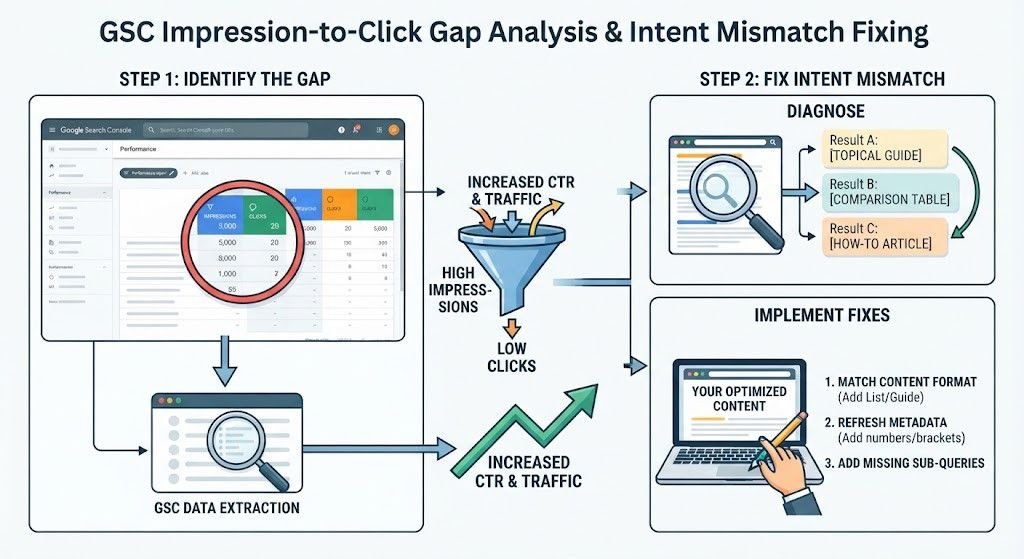
Every SEO specialist has experienced this scenario: you open Google Search Console, filter your performance report, and find a URL generating 5,000 impressions but pulling in fewer than 30 clicks. Google is putting your page in front of thousands of potential visitors, yet your click-through rate (CTR) is failing.
This phenomenon is known as the GSC Impression-to-Click Trap. Fixing it does not always require building new backlinks; instead, it demands a surgical adjustment to your metadata and search intent matching.
Phase 1: Identifying the Leak in Google Search Console
Your first step is isolating the underperforming URLs.
-
Open Google Search Console and navigate to the Performance Report.
-
Enable both Clicks and Impressions metrics.
-
Switch to the Pages tab and sort by highest impressions, filtering out URLs that have a low CTR (typically under 1.5%).
-
Click on that specific URL, then switch to the Queries tab to see the exact keywords triggering those impressions.
Once you isolate these queries, you hold the exact roadmap of what users are typing before bypassing your link.
Phase 2: Diagnosing Search Intent Mismatch
Why are users refusing to click? Usually, it comes down to a mismatch between format and expectation.
-
The Format Mismatch: If your page is a 2,000-word narrative essay, but Google’s SERP for that keyword consists entirely of quick bulleted lists or comparison tables, users will skip your result instantly.
-
The Depth Mismatch: If the user is looking for a quick tool or calculator, but finds a theoretical guide, they bounce back to the SERP.
To fix this, take your top GSC query and paste it into an incognito browser window. Examine the top three ranking competitors. Notice their layout, word count, heading structures, and media usage. You must adapt your content format to match what Google’s algorithm has already deemed the ideal user experience.
Phase 3: Restructuring Content and Injecting Semantic Gaps
To capture those lost clicks and steal traffic from competitors, execute the following content updates:
-
Incorporate Missing Sub-Queries: Look at the secondary queries listed in your GSC performance tab for that page. If users are searching for specific modifiers (e.g., “for beginners,” “free templates,” or “2026 update”), weave these exact terms and their semantic variations into dedicated sub-sections or FAQ accordions.
-
Optimize for Featured Snippets: Place concise definitions or bulleted lists right near the top of your article. This increases your chances of capturing position zero and driving up your CTR.
-
Leverage External References Safely: When linking to industry standards or data sources, ensure your outbound links use the
rel="nofollow"attribute to preserve link equity while providing authority signals to readers. For advanced technical audits, you can reference resources like Ahrefs Blog or Google Search Central.
Phase 4: Crafting Click-Worthy Meta Data
Once the content matches user intent, revamp your title tag and meta description.
-
Use Numbers and Brackets: Transform generic titles like “Best LinkedIn Tools” into high-performing alternatives such as “The Best 12 LinkedIn Tools [2026 Edition]”.
-
Match the Exact Keyword: Ensure the primary keyword triggering your GSC impressions appears naturally within the first 60 characters of your title tag.
Frequently Asked Questions (Q&A)
Q: How long does it take to see a CTR improvement after fixing intent mismatch?
A: Once you update your meta data and align your content format with user intent, Google often re-crawls the page quickly, and you can notice shifts in CTR and position within 1 to 3 weeks.
Q: Does fixing high impression, low CTR pages help with AI search engines like ChatGPT and Perplexity?
A: Yes. AI search engines favor structured, highly relevant content that directly answers specific user queries. By clearing out intent mismatches, your content becomes much easier for LLMs to parse and cite.
Q: Should I use follow or nofollow links when linking out in SEO content?
A: Use rel="nofollow" for external reference links, promotional links, or untrusted sources to ensure you retain full control over your site’s link equity flow.