Quick Answer: To check if ChatGPT mentions your website, open a Temporary Chat and ask brand, category and problem prompts with web search turned on. Then make sure OpenAI’s crawler (OAI-SearchBot) is allowed in your robots.txt. Finally, look for utm_source=chatgpt.com visits in Google Analytics 4 to confirm real traffic.
Your Google rankings may look fine, but there is a new question every website owner should ask: does ChatGPT even know your website exists? More people now ask ChatGPT for “the best SEO course” or “a trusted backlink service” instead of searching on Google. If your site never shows up in those answers, you are losing visitors who will never appear in your Search Console reports.
Most guides only say “ask ChatGPT about your brand.” That is just one small part of the picture. In this guide, you will learn a complete 4-Layer ChatGPT Visibility Audit that tells you whether ChatGPT mentions you, links to you, can read your pages, and sends you real visitors. It is free, and you can finish it in about 30 minutes.
Mention vs Citation: What Exactly Are You Checking?
Before you start testing, you need to understand one difference that most people mix up:
- Mention: ChatGPT writes your brand or website name in its answer, but there is no clickable link.
- Citation: ChatGPT shows your page as a source with a link, usually after it searches the web.
A mention builds trust and awareness. A citation brings clicks. ChatGPT can answer from what it learned during training, or it can search the web live. Mentions often come from training, while citations usually come from live search. If you want to understand where these answers come from, read our guide on where ChatGPT gets its information.
Layer 1: The Prompt Test (Does ChatGPT Mention You?)
Step 1: Always start with a clean chat
This is the mistake almost everyone makes. ChatGPT has memory. If you have talked about your website in past chats, it may mention your brand only because it remembers you, not because your site is popular. That gives you a false “yes.”
Open a Temporary Chat, or log out and use a private browser window. Now you see what a brand-new user would see.
Step 2: Build your prompt bank from Search Console
Do not guess prompts. Your best prompts are already sitting in Google Search Console. Go to Performance → Queries and pick 10 to 15 queries that bring you clicks. Then turn each into a natural question, the way a person would type it into ChatGPT.
Example: the Google query “seo course lahore” becomes “Which is the best SEO course in Lahore for beginners?”
Split your prompts into three types:
- Brand prompts: “What is YourSite.com?” or “Is [Your Brand] good for learning SEO?”
- Category prompts: “What are the best websites to learn SEO in Pakistan?”
- Problem prompts: “How do I find foreign SEO clients without Fiverr?”
Category and problem prompts matter most. Getting mentioned when your name is in the question is easy. Getting recommended when your name is not in the question is real AI visibility.
Step 3: Run every prompt three times
ChatGPT writes a fresh answer every time, so results change. Run each prompt three times in new chats and count how often your brand appears. Showing up 3 out of 3 times is strong. 1 out of 3 means you are on the edge.
Step 4: Watch out for name confusion
If your brand name is common or similar to another company, ChatGPT may describe a different business with your name. Always read what it says about you. If the details are wrong, that is not a real mention, and it shows you need clearer brand information on your site.
Layer 2: The Citation Test (Does ChatGPT Link to You?)
ChatGPT does not search the web for every question. To test citations, you need to make it search.
- Turn on the Search option, or start your prompt with “Search the web and…”.
- Run your category and problem prompts again.
- Click the Sources button and check the small link buttons inside the answer.
- Write down which of your URLs appear, and which competitor URLs appear instead.
Smart tip: The competitor pages ChatGPT cites are free research for you. Open them and note what they do better: a direct answer at the top, a comparison table, a fresh date, or short clear paragraphs. To learn how to build pages that AI tools prefer, see our guide on how to rank your website in AI search.
Layer 3: The Crawler Check (Can ChatGPT Read Your Site?)
If OpenAI’s bots are blocked, your pages cannot be cited in ChatGPT search, no matter how good your content is. OpenAI uses three different bots, and each one has a different job:
| Bot Name | What It Does | Should You Allow It? |
|---|---|---|
| OAI-SearchBot | Finds pages to show in ChatGPT search results | Yes, if you want citations |
| ChatGPT-User | Opens a page when a user’s question needs it | Yes, in most cases |
| GPTBot | Collects content that may be used for AI training | Your choice |
Check your robots.txt
Open yourwebsite.com/robots.txt in your browser. If you see this, ChatGPT search is blocked:
User-agent: OAI-SearchBot
Disallow: /
To allow it, change it to:
User-agent: OAI-SearchBot
Allow: /
Also check your security plugin and firewall settings, such as Cloudflare bot protection. Some of them block AI bots automatically, even when your robots.txt allows them.
Check your server logs (and spot fake bots)
Open the access logs in your hosting control panel and search for OAI-SearchBot and ChatGPT-User. If you find visits in the last 30 days, ChatGPT is actively reading your pages.
One thing most guides skip: anyone can pretend to be an OpenAI bot. Spam scrapers often copy the bot name. OpenAI publishes the official IP addresses of its bots in its crawler documentation. If a visit says “OAI-SearchBot” but the IP is not on that list, it is fake, so do not count it.
Layer 4: The Traffic Check (Is ChatGPT Sending You Visitors?)
When ChatGPT links to your site from a search answer, it adds utm_source=chatgpt.com to the link. This makes the visits easy to find in Google Analytics 4.
Quick method
- Open GA4 and go to Reports → Acquisition → Traffic acquisition.
- Change the main dimension to Session source / medium.
- Type
chatgptin the search box above the table.
Track every AI tool at once
Create a free-form exploration, add Session source as a dimension, and use this “matches regex” filter:
chatgpt\.com|openai\.com|perplexity\.ai|gemini\.google\.com|copilot\.microsoft\.com|claude\.aiAdd Landing page as a second dimension. Now you can see exactly which articles AI tools send people to. These are your “AI winner” pages, so update and protect them first. Compare this data with your Search Console numbers too. Our article on Google Search Console vs Semrush and Ahrefs explains which data you can fully trust.
Score Your Site: The ChatGPT Visibility Scorecard
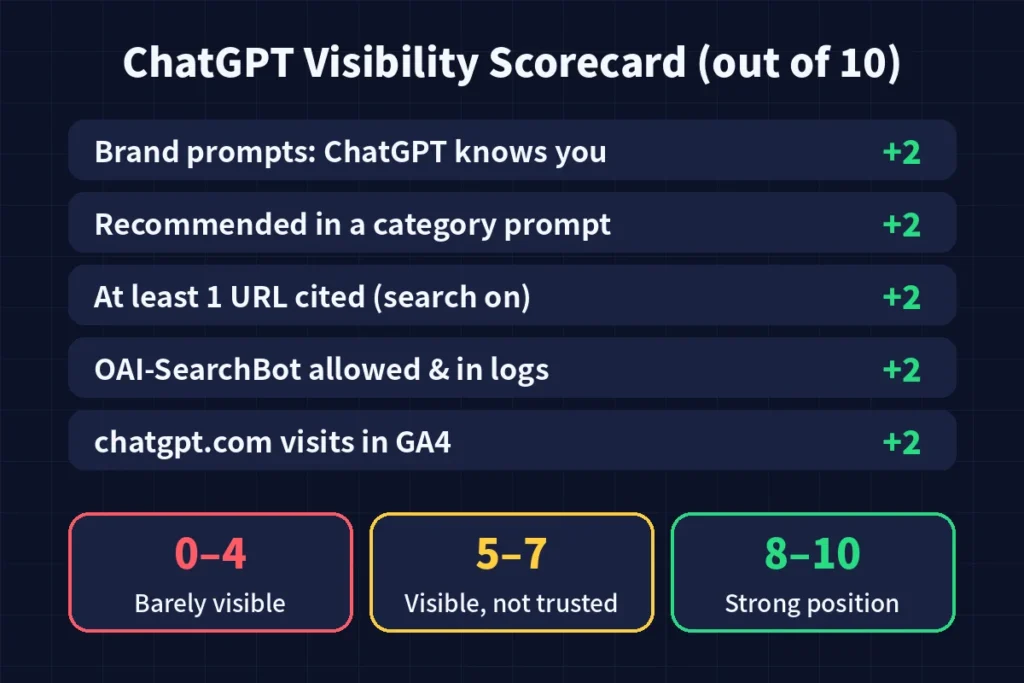
Turn all four layers into one simple score out of 10, so you can track progress every month:
| Check | Points |
|---|---|
| ChatGPT correctly describes your brand (brand prompts) | 2 |
| Recommended in at least 1 category prompt | 2 |
| At least 1 of your URLs cited with search on | 2 |
| OAI-SearchBot allowed and seen in server logs | 2 |
| Any visits from chatgpt.com in GA4 (last 30 days) | 2 |
| Total | 10 |
- 0–4 (Barely visible): Fix Layer 3 first. Your site may be blocked.
- 5–7 (Visible, not trusted): Improve your content and get more brand mentions on other sites.
- 8–10 (Strong position): Target more category prompts and keep your pages fresh.
Save your prompts, dates and scores in a simple Google Sheet. Repeat the audit once a month. A rising score is the clearest proof that your AI SEO work is paying off.
What to Do If ChatGPT Does Not Mention You
- Answer first, explain later. Put a clear 2–3 sentence answer right under each heading. AI tools quote content that is easy to lift.
- Get talked about on other websites. ChatGPT learns about brands from what other sites say. Guest posts, interviews, and “best of” lists all help.
- Use one brand name everywhere. Keep the same name on your website, social profiles and directories so AI sees you as one brand.
- Keep pages fresh. Update dates, data and examples regularly. Live search answers prefer current pages.
- Make your About page detailed. Say who runs the site, what you offer and since when. This helps AI understand and trust your brand.
Common Mistakes to Avoid
- Testing in your own logged-in chat with memory turned on.
- Running one prompt once and trusting the result.
- Checking only brand prompts and ignoring category prompts.
- Counting fake bot visits as real OpenAI crawls.
- Letting a security plugin block all AI bots without knowing it.
- Expecting results in one week. AI visibility grows over months, just like normal SEO.
Frequently Asked Questions
Is there a free way to check if ChatGPT mentions my website?
Yes. ChatGPT, your robots.txt file, your hosting logs and Google Analytics 4 are all free. Paid tools only automate the same checks for larger sites.
Why does ChatGPT give a different answer every time?
ChatGPT creates each answer fresh, so the brands it picks can change. Run each prompt three times and count how often you appear to get a fair result.
Does ranking on Google help me show up in ChatGPT?
It helps, but it is not the same. ChatGPT search uses its own crawler and also looks at how often other websites mention your brand. Good Google SEO is a strong base, not a guarantee.
Should I block GPTBot?
That is your choice. Blocking GPTBot stops your content from being used for AI training, but it does not block OAI-SearchBot, which is the bot that matters for ChatGPT search citations.
How often should I run this audit?
Once a month is enough for most websites. If you are actively working on AI SEO, check your main category prompts every two weeks.
Final Thoughts
Checking if ChatGPT mentions your website is not a one-time question. It is a monthly habit. Use the 4-layer audit to test mentions, citations, crawler access and real traffic, and use the scorecard to measure your growth. Websites that start tracking AI visibility today will be the ones ChatGPT recommends tomorrow.