Profile Backlinks in 2026: Do They Work? 34 Real Examples

Quick answer: Profile backlinks are links you add to your website from a user profile, bio or account page on another platform, such as GitHub, Medium, Quora or Linktree. In 2026, profile backlinks will not push a page to the top of Google on their own. They are still useful for three jobs: helping Google discover a new site, building a clear brand footprint across trusted platforms, and keeping your link profile natural. Below is the exact set of 34 links we built for this, grouped by type, plus the method we used.
What Are Profile Backlinks?
A profile backlink is a link that sits on your account page on a third-party site. Most platforms give you a “Website” field, a bio box or a links section. When you add your URL there, the platform links back to you.
There are actually two close cousins that people group under the same name:
- Pure profile links: the link sits on your profile page only (for example a Quora or Dribbble profile).
- Web 2.0 and content links: you publish a post, document or project on the platform and link from inside it (for example a Blogger post, a GitHub README or a Scribd PDF).
The second type usually carries more context, because the link sits inside real content about a topic. That is why our list below mixes both.
Do Profile Backlinks Still Work in 2026?
The honest answer is: they work, but only for a small, specific job. When a user asked Google’s John Mueller whether profile links work, his reply was a plain “no”, as reported by Search Engine Roundtable. In other words, profile links alone will not rank you.
So why build them at all? Because ranking is not the only thing they help with:
- Discovery: trusted platforms get crawled often, so a link from them can help Google find a brand-new site.
- Brand entity: the same name, logo and link across many trusted platforms helps search engines and AI tools connect the dots about who you are.
- Natural link mix: a real business has profiles everywhere. A link profile with only guest posts looks less natural.
- Some referral traffic: an active Quora, Medium or Product Hunt profile can send real visitors.
What about nofollow profile links?
Most profile links are nofollow. That does not make them useless. Since 2019, Google treats nofollow, sponsored and ugc as hints rather than strict rules, according to Google Search Central. Google can still use a nofollow link for discovery, but nobody outside Google knows how much ranking credit it passes. So treat nofollow profile links as discovery and brand signals, not as ranking power.
Profile Backlinks vs Other Link Types
| Link type | Effort | Ranking power | Best use |
|---|---|---|---|
| Profile backlinks | Very low | Low | Discovery, brand footprint, link mix |
| Web 2.0 posts and documents | Low to medium | Low to medium | Topical context, supporting pages |
| Guest posts | Medium to high | Medium to high | Main ranking links |
| Editorial mentions | High | Very high | Authority and trust |
Think of profile backlinks as the foundation layer. They support your real ranking links, they do not replace them.
Our 34 Profile Backlinks: Real Examples by Type
Here is a real, live set we built for our network sites. Use it as a template for your own list. Each group does a slightly different job.
1. Posts and articles (Web 2.0)
These are full posts on free blogging and social platforms. Each one covers a real SEO topic and links back naturally.
- Blogger: Internal linking for small blogs
- Google Sites: SEO basics guide for beginners
- WordPress.com: How long does SEO take?
- Wix: How to write a meta description that gets clicks
- Medium: Small business SEO
- LiveJournal: LiveJournal post
- X post: X status update
- X article: X long-form article
- Product Hunt discussion: Which SEO task gave you the fastest results?
- Flipboard: Magazine Reader UK magazine
2. Documents, decks and projects
These platforms host files and code. One useful asset, such as an SEO checklist, can be reused in different formats across many of them.
- GitHub: SEO checklist for beginners repo
- Bitbucket: SEO meta tags snippets
- Speaker Deck: SEO checklist deck
- Scribd: The Beginner’s SEO Checklist
- Issuu: SEO checklist publication
- Behance: SEO Checklist for Beginners: 7 Simple Steps
- CodePen: CodePen project
3. Pure profile pages
These are classic profile backlinks: a complete bio, a logo, and the website field filled in.
- SoundCloud: soundcloud.com/st-hint
- 500px: 500px.com/p/sthintcom
- Speaker Deck: speakerdeck.com/sthint
- Linktree: linktr.ee/sthintcom
- Dribbble: dribbble.com/st-hint
- Vimeo: vimeo.com/user252797056
- Product Hunt: producthunt.com/@st_hint
- Academia: independent.academia.edu/sthint
- Quora: quora.com/profile/St-Hint
- Goodreads: Goodreads profile
- ReverbNation: reverbnation.com/magazinereader
- Diigo: diigo.com/user/sthint00
- Last.fm: last.fm/user/dthint
- BuzzFeed: BuzzFeed community profile
4. Archive.org snapshots
These are not backlinks in the usual sense. A Wayback Machine snapshot is a saved copy of your page. It gives you a public, dated record of your site, which is handy as proof and for history. Do not expect ranking value from it.
How to Build Profile Backlinks the Right Way (7 Steps)
- Prepare a brand kit first. Keep one brand name, one logo, a short bio (150 characters) and a long bio (500 characters) in a note. Using the same details everywhere builds a clear brand entity.
- Pick platforms that fit your niche. For an SEO brand, GitHub, Speaker Deck, Scribd and Product Hunt make more sense than a random music site. Relevance beats raw numbers.
- Create one reusable asset. We turned a single SEO checklist into a GitHub repo, a Scribd PDF, an Issuu publication, a Speaker Deck and a Behance project. One idea, five formats.
- Fill every field. Add the photo, bio, location and website link. Empty, thin profiles are the ones that look like spam.
- Vary your anchors. Use your brand name on some platforms, the naked URL on others, and a topic phrase inside posts. Never repeat the same keyword anchor everywhere.
- Check the link while logged out. Some platforms hide profiles until the email is verified or the account is a few days old. Open the public URL in a private window to confirm the link shows.
- Track everything in a sheet. Note the platform, profile URL, link type (dofollow or nofollow), date and whether Google has indexed it. Our free SEO audit template works well as a starting point.
Common Profile Backlink Mistakes
- Building hundreds in a day. A sudden spike of thin profiles looks automated. Ten to twenty good ones a week is plenty.
- Buying cheap bulk packages. Most bulk sellers reuse the same spammy sites and the same bio. That adds risk and no value.
- Using a keyword anchor everywhere. It is the fastest way to make a link profile look unnatural.
- Ignoring indexing. A profile Google never crawls does nothing. Share the page, link to it from your other profiles, and see our guide on whether a backlink indexing plugin can help.
- Forgetting your own site. Profile links cannot fix weak on-page SEO. If your pages are stuck, fix poor internal linking first.
Where Profile Backlinks Fit in a Real SEO Plan
A simple order that works for most new sites:
- Fix technical and on-page basics.
- Build 20 to 40 quality profile and Web 2.0 links for discovery and brand footprint.
- Publish helpful content that answers real searches.
- Earn guest posts and editorial mentions as your main ranking links.
If your site still does not show up anywhere after this, read what to do when your site is invisible on Google and AI.
FAQs About Profile Backlinks
Are profile backlinks good for SEO?
They are good for discovery, brand footprint and a natural link mix. They are weak for rankings on their own. Use them as a foundation, not as your main strategy.
Are profile backlinks dofollow or nofollow?
Most are nofollow, and some platforms change their policy over time. Check each link with your browser’s inspect tool before you count it as dofollow.
How many profile backlinks should I build?
For a new site, 20 to 40 complete, relevant profiles is a sensible start. More is not better if the extra profiles are thin.
Can profile backlinks get my site penalized?
A few genuine profiles will not hurt you. Mass-produced spam profiles with keyword anchors can be ignored by Google or, in bad cases, count as a link scheme.
Do archive.org snapshots count as backlinks?
Treat them as a dated public record of your site, not as ranking links.
Conclusion
Profile backlinks are the easiest links you will ever build, and that is exactly why they carry little ranking power. Build a small set of complete, on-brand profiles, reuse one strong asset across document platforms, keep your anchors natural, and track everything. Then put most of your energy into content and real editorial links. Our 34 examples above show what a clean, varied foundation looks like.

Muhammad Amjad Butt
SEO Trainer, CEO & Founder of PB Outreach
Muhammad Amjad Butt is an SEO specialist from Faisalabad, Pakistan, practicing SEO since 2006. He is the CEO and founder of PB Outreach and the trainer behind Pak SEO Training. He has trained 500+ students and completed 1,000+ guest posting projects for clients.
📚 Related Posts
Semrush Organic Rankings 2.0 Review: 4 Bugs & Why It Shows 0 Traffic (2026)
Honest Semrush Organic Rankings 2.0 review (2026). Learn how AI-Influenced Traffic, Mentions, and Citations work—plus 4 common bugs causing 0 traffic errors…
How Link Building Agencies Work in 2026 (With Real Agency Case Study)
Discover how link building agencies work behind the scenes—from outreach and publisher networks to pricing. Includes a real case study on Interamplify…
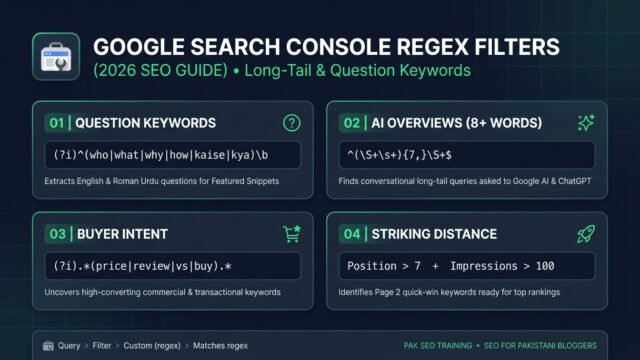
Google Search Console Regex Filters: Find Long-Tail Keywords (2026)
• Learn how to use Google Search Console regex filters to extract long-tail, question, and AI Overview keywords with copy-paste formulas and…